Scroll knobs · press keys · or use the aircraft panel. Open Learn ·
Situation
North-up overview of your track, flight plan, and nearby airports. Independent of the unit’s moving map.
Aircraft
No lesson active
- HDG
- ---
- TRK
- ---
- GS
- ---
- POS
- —
Default scenario: ~20 NM south of KPAE, 15 kt wind from 270°, AP NAV. Press DTO KPAE (or the D→ key), then watch the needle center and the map track. Share a lesson or demo as a link with Copy scenario link — see scenario links below.
Instructor (training-only failure injection)
Current wind: ---. Failures are awareness-only (CDI/lessons keep working) and are never saved — reload clears them.
Quick tips
- Use the Situation map (toggle above) to see the big picture while the unit’s own map stays authentic.
- Start in Learn for chapters & quizzes, then practice on this Trainer.
Training use only — not for real-world navigation.
What's in the box
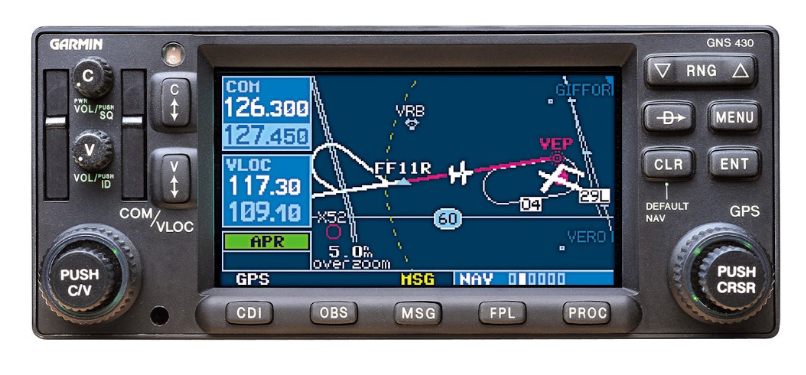
- Photorealistic faceplate matching the real unit layout (COM/VLOC volumes, flip-flops, dual knobs, bottom key row).
- Full page catalog: NAV (6), WPT (10), AUX (4), NRST (8), FPL active+catalog, PROC menu; three-window LCD.
- IFR training: multi-leg FPL, RNAV and ILS into KPAE, SID/STAR, OBS, VLOC auto-switch.
- Learning Academy — 8 chapters of articles, tutorials, quizzes, then in-unit practice lessons with real LCD screenshots.
- External situation map (toggle on Trainer) plus PNW seed navdata; nationwide FAA dataset when published.
Training use only — not for real-world navigation. No manufacturer branding.
How to fly it
The knobs and keys
- Right knob — outer ring changes page group (NAV → WPT → AUX → NRST), inner ring changes pages, push toggles the cursor.
- Left knob — tunes standby frequency (outer = MHz, inner = kHz). Push toggles COM/VLOC focus. C / V flip-flops swap standby into active.
- COM PWR (C) — power on/off. Boot: welcome → database → self-test → satellite status.
- D→ / MENU / CLR / ENT — Direct-To, page options, clear (hold = Default NAV), enter.
- FPL / PROC — flight plan and procedures. RNG zooms the map. CDI / OBS switch needle source and freeze sequencing.
Four flights to try
- Direct-To under wind — DTO KPAE with AP NAV; watch TERM-scale CDI and magenta track.
- RNAV approach — LOAD APR, fly to MAP SUSP, then SUSP/Miss.
- VOR tracking — tune PAE 110.60 VLOC, CDI, set OBS, hand-fly to center TO.
- ILS coupled — PROC → ILS 16R, tune 109.30 VLOC, watch auto CDI VLOC and glideslope.
Prefer structure? Open Learn for the full path, then return to Trainer to fly.